Kiiroo Keon Review 2026: Is Keon 1 Still Worth Buying?
Disclosure: This article contains affiliate links. If you buy through one of these links, we may earn a commission at no extra cost to you.
📑 Introduction
Keon 1 is no longer Kiiroo’s newest automatic masturbator, but that does not make it irrelevant. It still provides the feature most buyers actually want: a motorized sleeve that moves up and down without your hand doing the work. It can run offline, connect to the FeelConnect app, follow interactive videos and VR scripts, or let a partner control the motion from somewhere else.
The harder question is value. Keon 2 is faster, travels farther, charges more quickly, and works with a broader range of sleeves. Keon 1 counters with a lower price, years of real-world use behind it, mature software support, and enough speed to become intense long before most people reach its maximum setting.
For this Kiiroo Keon review, I focused on the parts that matter after the product photos stop being exciting: loading the sleeve, finding a stable position, changing speed and stroke length without looking, how the motion feels at slow and fast settings, the amount of noise, app setup, cleaning, and whether the older hardware still makes sense next to its replacement.
The short version is simple. Keon 1 remains a good automatic male masturbator when it is meaningfully cheaper than Keon 2 and you are happy using Kiiroo’s stroker ecosystem. It is not the best choice for someone who wants USB-C charging, maximum stroke travel, easy third-party sleeve swapping, or the newest hardware at any price.
✨ Quick Verdict
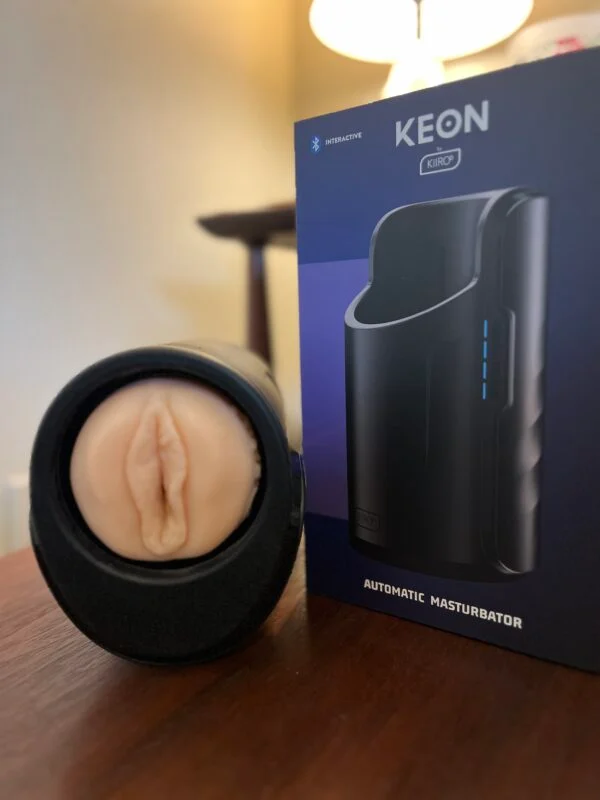
The conclusion of this Kiiroo Keon review is that Keon 1 remains worth buying for the right price. Its automatic motion feels substantially different from vibration-only male toys, and manual control is good enough that the device remains useful even if you never sync it with a video. FeelConnect, partner control, interactive content, and modular accessories add real value rather than existing only as features on the box.
The tradeoffs are equally real. The unit weighs about 2.4 pounds, takes roughly four hours to charge, can become mechanically loud at high speed, and works best when supported by a pillow, clamp, or stable surface. Its standard sleeve system is also less flexible than Keon 2’s newer cradle design.
Best for: Buyers who want a proven hands-free stroker for automatic motion, VR, interactive content, or long-distance partner control at a lower cost than Keon 2.
Skip it if: You want a compact bedside toy, nearly silent operation, broad sleeve compatibility without extra hardware, or the longest and fastest stroke Kiiroo currently offers.
Check Best Price & Deals🔥 7 Reasons Keon 1 Still Makes Sense
- It creates real automatic movement. The sleeve travels physically instead of relying on vibration to imitate a stroke.
- Speed and travel are separate controls. You can choose short, fast head-focused motion or slower movement across more of the shaft.
- Manual mode works offline. The core experience does not depend on an account, internet connection, or paid content.
- FeelConnect adds useful control. Patterns, direct app adjustments, and connected sessions expand the machine rather than replace its physical buttons.
- It supports VR and interactive content. Accurate scripts can turn video movement into synchronized sleeve movement.
- A partner can control it remotely. Long-distance control gives couples a practical reason to choose Keon over a basic automatic cup.
- The system can grow later. FeelStar sleeves, PowerBlow suction, and PowerShot vibration provide an upgrade path without replacing the motor base.
Those advantages are not exclusive to Keon 1, but they explain why the older machine remains commercially relevant when its price is lower than Keon 2.
📊 Quick Comparison: Kiiroo Keon 1 Buying Options
📊 Quick Comparison: Kiiroo Keon 1 Buying Options
| Product / Setup | Sales Status | What Is Included | Deal |
|---|---|---|---|
| Keon 1, Stroker Not Included | Selectable configuration on the Keon product page | Keon device only; requires a compatible stroker setup | See Deal |
| Keon 1, Stroker Included | Selectable configuration on the same Keon product page | Keon plus the included FeelStroker option | See Deal |
| Keon 1 + FeelStar Sleeve | Separate products, not a single bundle listing | Buy Keon and a compatible FeelStar sleeve separately; confirm which case is needed | FeelStar |
| Keon 1 + Table Clamp | Separate accessory, not a bundle | Keon Table Clamp only; Keon is purchased separately | See Clamp |
| Keon 1 + Multifunctional Pillow | Separate accessory, not a bundle | Keon 1 Multifunctional Pillow only; Keon is purchased separately | See Pillow |
| Keon 1 Accessory Bundle | Official accessory bundle, Keon sold separately | Neck strap, hand strap and phone holder; no clamp or pillow | See Deal |
For a first purchase, select Stroker Included on the Keon 1 product page. It is a selectable package configuration, not a separate standalone bundle URL. The FeelStar sleeves and positioning accessories are sold separately; the two official bundle pages above are the couple set and the accessory set.
✅ Pros & ❌ Cons
| Pros | Cons |
|---|---|
| Up to 230 automatic strokes per minute with adjustable speed and stroke length | Four-hour charging feels dated beside newer USB-C toys |
| Works offline, through FeelConnect, with interactive content, or under partner control | Heavy body and mechanical noise make support or mounting worthwhile |
| Compatible with Kiiroo FeelStroker and FeelStar sleeves | |
| Expandable with PowerBlow suction and PowerShot vibration accessories |
🧪 My Real Testing Experience
The Setup (Sleeve, Lube and Positioning)
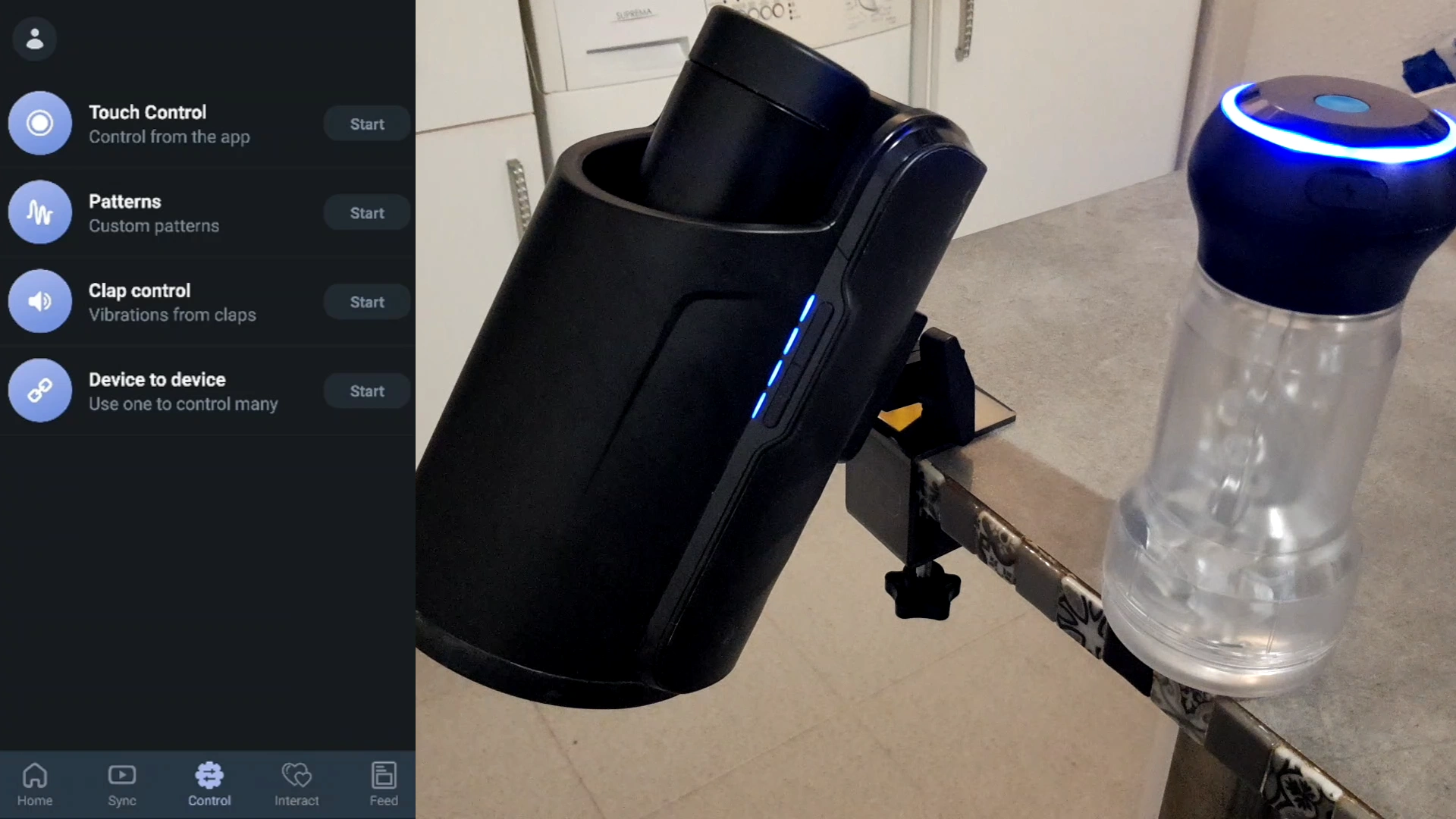
For this Kiiroo Keon review, I started with the physical setup rather than the app. The first thing I noticed was the weight. Keon 1 does not feel like a handheld stroker with a small motor bolted on. The main body weighs roughly 1.1 kg before adding the sleeve, and the shape makes far more sense once it is braced than when it is hanging from one hand.
I started with the standard FeelStroker. I removed the TPE insert, warmed it under comfortably warm water, dried the outside, and applied a generous amount of water-based lubricant through the entrance and along the first part of the canal. The sleeve then went back into its hard case before the case dropped into the moving cradle. It is important to seat it fully; a partially loaded case adds wobble and makes the movement feel less controlled.
For the first session, I placed a firm pillow beneath the machine and used it while lying back. That setup was more comfortable than holding it against my body because the pillow absorbed some movement without allowing the entire unit to rock. A table clamp offers a more fixed hands-free position, but I would not call it mandatory on day one. A stable bed setup is enough to learn what speed and travel feel good before buying another accessory.
I also began in manual mode rather than opening FeelConnect immediately. The controls divide speed and stroke length, which is the right way to learn the machine. Increasing speed does not create the same effect as increasing travel, and changing both at once makes it harder to understand why a setting feels better or worse.
The Sensation (Short Strokes vs. Longer Travel)
At low speed and short travel, the sleeve concentrated most of its movement around the glans and frenulum. That setting felt more controlled than I expected from a large machine. It was useful for warming up because the texture stayed active without dragging over the entire shaft on every cycle.
Increasing stroke length changed the sensation more than simply pushing the speed higher. The sleeve began pulling farther down, carrying lubricant along the shaft and allowing different internal sections to make contact. The official specification lists up to roughly 70-75 mm of travel, which is not a full-length stroke for every body, but it is enough to feel clearly mechanical rather than like vibration inside a stationary cup.
The middle speed range was where Keon 1 felt best to me. The movement remained smooth enough to follow, the sleeve texture stayed distinct, and I could edge by shortening the stroke without stopping the machine. At the top end, the experience became less about realism and more about relentless repetition. The motor can reach up to 230 strokes per minute in its fastest, shortest configuration, but maximum speed is not automatically the most satisfying setting. A slightly longer, slower stroke gave the sleeve more time to grip and release.
Support mattered more as speed increased. When I held the unit loosely, the machine transferred some motion into my wrist and abdomen. Once I braced it, more of the movement stayed inside the sleeve. That was the point where the hands-free stroker concept really worked: instead of moving the toy, I could adjust my body a few inches and let the machine keep the rhythm.
The App and Interactive Test

During the connected portion of this Kiiroo Keon review, FeelConnect added the most value after I already knew my safe manual range. Pairing over Bluetooth was straightforward, and the app made it easier to draw or select patterns without reaching behind the device. Wi-Fi support becomes more useful for compatible VR platforms and interactive sessions where a stable connection matters more than direct phone control.
Content sync was convincing when the source had a well-made script. Clear changes in pace translated into obvious changes in the sleeve, and slow scenes benefited more than I expected because the machine could hold a patient rhythm without a hand gradually speeding up. Poorly matched or overactive scripts felt random, so the quality of the content still matters. The hardware cannot make an inaccurate script feel natural.
Remote partner control was simpler and, in some ways, more personal. Instead of letting a video dictate every movement, my partner could shorten the stroke, pause, or raise the speed in response to what I said. That made the connected feature feel less like a demo and more like actual interaction.
The Flaw (The Brutal Truth)
Keon 1 is a machine, and it never completely disappears into the experience. At higher speeds I could hear the repeated motor and cradle movement, especially in a quiet room. Headphones reduced the distraction during synced content, but anyone expecting a nearly silent toy will notice it.
The battery and charging system are the other signs of age. Kiiroo lists roughly 30 minutes to two hours of use depending on intensity, with about four hours required for charging. A normal session did not force me to stop, but the charging time means forgetting to plug it in can ruin the next plan. Unlike Keon 2, it does not offer modern fast charging or continuous wall-powered operation.
⚙️ How Keon 1 Works in Daily Use

Manual Mode Is Better Than It Sounds
The app receives most of the attention, but offline control is one of Keon 1’s strongest practical features. You can change the motion from the device without an account, internet connection, subscription, or compatible video. That makes quick sessions much less complicated.
The two variables are worth treating separately:
- Stroke length changes how much of the shaft and sleeve texture become involved.
- Stroke speed changes how often that path repeats.
For edging, I preferred a medium travel distance and a moderate pace. For focused stimulation around the head, shortening the stroke worked better than simply slowing everything down. This control is the main reason Keon feels more versatile than budget machines with one fixed path and several speed levels.
FeelConnect, VR and Interactive Video
Keon can connect through Bluetooth or Wi-Fi and works with FeelConnect on iOS and Android. From there, it can respond to supported interactive videos, VR content, live cam platforms, FeelMe AI, compatible partner toys, and direct long-distance control.
No connected platform is necessary for basic use. That distinction matters because buyers sometimes see “interactive” and assume the toy becomes useless without a paid content library. It does not. The app and content expand what Keon can do; they are not required to make the motor move.
If VR is the main reason you are buying, check platform compatibility before checkout rather than assuming every headset, browser, and video site works the same way. The best VR masturbator experience depends on three parts working together: the machine, the connection method, and an accurate script.
Sleeves and Modular Upgrades
Keon 1 is designed around Kiiroo FeelStroker and FeelStar cases. Different FeelStar sleeves change the entry, tightness, internal texture, and overall intensity without requiring a new motor unit. That makes the sleeve choice more important than it first appears; the machine supplies movement, but the TPE tunnel decides where the friction lands.
Kiiroo also sells a compatible stroker case for buyers who want to experiment with other sleeves. Confirm the exact case and dimensions before ordering, because compatibility is less universal and less straightforward than the newer Keon 2 cradle system.
The modular path is more interesting for existing owners. PowerBlow can add active suction to a compatible Kiiroo stroker. PowerShot adds dual-motor vibration when used with its dedicated compatible case. Both can be combined with Keon, although each additional component increases price, setup time, and cleanup.
My advice is to buy the machine and one sleeve first. Add suction or vibration only after you know what the automatic stroke is missing for you.
🔊 Noise, Battery, Cleaning and Storage
How Loud Is Kiiroo Keon 1?
It is not discreet at high speed. The sound is more mechanical than a vibrator’s hum: a repeated motor-and-carriage rhythm that becomes quicker and more noticeable as the machine accelerates. A closed door and background audio help, but I would not use it beside a sleeping partner and expect them not to notice.
Lower and medium speeds are easier to live with, particularly when the base is supported. Hard surfaces can amplify vibration, so placing the unit directly on a hollow nightstand is worse than using a firm cushion or padded mount.
Battery Life and Charging
Kiiroo lists approximately 30 minutes to two hours of runtime depending on intensity, with around four hours for a full charge. High speed, long travel, interactive patterns, and resistance from a tight sleeve all affect real runtime.
The battery is sufficient for ordinary sessions, but the charging ratio is not convenient by current standards. I would charge it after use rather than waiting for the low-battery warning before the next session.
Cleaning the FeelStroker
The electronic Keon body is not waterproof. Remove the stroker case before cleaning and wipe the machine with a slightly damp cloth only.
The sleeve needs more attention:
- Remove the TPE sleeve from its hard case.
- Rinse the sleeve with warm water and mild soap or a compatible toy cleaner.
- Rinse the case separately or wipe it clean.
- Let both pieces dry completely before reassembly.
- Apply renewing powder occasionally if the TPE begins feeling tacky.
Drying is the slow part. Putting a damp TPE sleeve back into a closed case can create odor and shorten its useful life. The cleanup is manageable, but it is more involved than rinsing a small waterproof silicone toy.
Storage
Keon 1 is too large to disappear into a small bedside drawer once a stroker and cable are included. I would store the clean, dry sleeve separately from the motor body and keep the charger in the same bin. If privacy is important, measure your storage space before ordering rather than relying on product photos.
🆚 Kiiroo Keon 1 vs. Keon 2
Any current Kiiroo Keon review needs to address the newer model directly. Keon 2 is the better machine on hardware alone, while Keon 1 remains the value option.
| Feature | Keon 1 | Keon 2 |
|---|---|---|
| Stroke travel | About 70-75 mm | Up to 95 mm |
| Maximum rate | Up to 230 strokes per minute | Up to 300 strokes per minute |
| Controls | Manual, app-controlled and interactive | Eight operational modes with front-facing controls |
| Finisher Mode | No | Yes |
| Charging | About four hours by older USB connection | About 90 minutes with USB-C PD |
| Wall-powered use | No | Yes, with compatible power hardware |
| Battery life | Roughly 30 minutes to two hours depending on use | Up to three hours |
| Sleeve options | Best with Kiiroo strokers; other setups may need a separate case | Broader compatibility through the newer cradle system |
| Weight | About 1.1 kg | About 996 g |
| Best reason to buy | Lower price and proven core performance | Longer, faster and more flexible next-generation setup |
Buy Keon 1 when the price gap is meaningful and you mainly want automatic movement with Kiiroo sleeves. It still handles manual control, FeelConnect, VR, interactive video, AI content, and remote partner play.
Buy Keon 2 when this will be your primary machine for years, you already own third-party strokers, or you care about faster charging, wall power, longer travel, and maximum speed. Those upgrades are practical, not cosmetic.
I would not pay almost the same price for Keon 1 if Keon 2 is only slightly more expensive. The older device becomes compelling when the discount is large enough to offset its slower charging and narrower hardware design.
🛒 Buying Advice: Who Should Get Keon 1?
Buy Keon 1 If…
- You want real automatic in-and-out motion rather than vibration or contraction.
- You plan to use FeelConnect, VR, interactive video, or remote partner control.
- You are comfortable with Kiiroo FeelStroker or FeelStar sleeves.
- You can support or mount a 2.4-pound device during longer sessions.
- The current Keon 1 discount is substantially better than the Keon 2 price.
Skip Keon 1 If…
- You want a small, quiet toy for quick use and easy storage.
- You dislike removing, washing, drying, and powdering TPE sleeves.
- You want to use many third-party strokers with minimal adapter research.
- You need fast USB-C charging or the option to run from wall power.
- You specifically want Keon 2’s 95 mm travel, Finisher Mode, or higher peak speed.
Which Package Should You Buy?
If this Kiiroo Keon review has convinced you that the older model fits your budget, choose the package carefully. New buyers should get a bundle with a FeelStroker or FeelStar included. The standard FeelStroker is the safer starting point because it lets you learn the machine before deciding whether you want a tighter or more aggressive tunnel.
Existing FeelStar owners can buy the device-only option if their case is compatible. Buyers planning a fixed hands-free setup should consider a clamp or positioning pillow, but I would test the machine with ordinary support before paying for both accessories.
Do not buy PowerBlow and PowerShot on the first order unless you already know you want suction or vibration. Keon’s automatic movement is distinct enough to judge on its own.
❓ FAQ: Kiiroo Keon Review Questions
Is Kiiroo Keon 1 still worth buying in 2026?
Yes, when it is clearly cheaper than Keon 2. Keon 1 still provides automatic stroking, adjustable speed and travel, FeelConnect, VR and interactive content support, and remote partner control. Keon 2 is the better hardware purchase when the prices are close.
Does Kiiroo Keon work without an app?
Yes. Manual mode lets you control speed and stroke length directly from the machine without an app, internet connection, or interactive content.
How fast is Keon 1?
Kiiroo lists up to 230 strokes per minute in the fastest, shortest-stroke configuration. The maximum is intense, but medium speed with more travel often feels more natural and makes better use of the sleeve texture.
Is Keon 1 fully hands-free?
The motor moves the sleeve automatically, but the machine still needs support. A pillow, stable surface, positioning accessory, or table clamp prevents its weight and movement from shifting the entire setup.
Can Keon 1 sync with VR videos?
Yes. It can use Bluetooth or Wi-Fi with FeelConnect and supported interactive platforms. Results depend on the platform, connection, and quality of the script attached to the video.
Can a partner control Keon from long distance?
Yes. FeelConnect supports private remote sessions, allowing a partner to control the machine over the internet. Testing the connection before the session helps avoid setup interruptions.
Does Keon 1 work with Fleshlight sleeves?
Keon 1 is built primarily for Kiiroo stroker cases. Kiiroo sells a compatible case for certain alternative sleeve setups, but buyers should confirm the specific sleeve dimensions and required hardware before ordering. Keon 2 offers the clearer route for broad third-party compatibility.
Is Kiiroo Keon waterproof?
No. Keep the electronic unit away from running water. Remove the sleeve and case for washing, then wipe the machine body with a slightly damp cloth.
What lubricant should I use with a FeelStroker?
Use water-based lubricant. Oil- or silicone-based products may damage TPE or make cleaning more difficult. More lube is usually better than forcing a dry, tight sleeve against the moving motor.
🏆 Final Verdict: Should You Buy Kiiroo Keon 1?
This Kiiroo Keon review comes down to price versus convenience.
Keon 1 still delivers the experience it was built to provide. The sleeve physically travels up and down, the speed and stroke length can be adjusted independently, manual mode works without an app, and FeelConnect opens the door to VR, scripts, AI content, live platforms, and partner control. None of those abilities stopped being useful when Keon 2 appeared.
What changed is the standard around it. Four-hour charging now feels slow. The 1.1 kg body feels heavy. The original stroke is shorter, the sleeve system requires more checking, and maximum-speed operation is not quiet. Keon 2 fixes many of those complaints.
That makes Keon 1 a value purchase rather than the automatic default. If the sale price saves enough money and you are satisfied with Kiiroo sleeves, it remains one of the most capable ways to enter connected automatic play. If the price gap is small, buy the newer model instead.
Best for value: Keon 1 with FeelStroker
Best for VR and interactive content: Keon 1 or Keon 2, depending on budget
Best long-term hardware choice: Keon 2
Best simple experience: Keon 1 in manual mode at medium speed and travel
💡 Pro Tip
If you are comparing the entire brand rather than only this machine, read our Kiiroo reviews and product guide. If the longer stroke, faster charging, and broader sleeve system sound more important than the Keon 1 discount, compare them in our Kiiroo Keon 2 review before ordering.


0 Comments